
Soundmap - Find Your Songs
SuperStar LabsMusic & Audio
4.54.14K Reviews
- Version
- 2.18.1
- Installs
- 500.00K
- Age Rating
- Teen
Screenshots
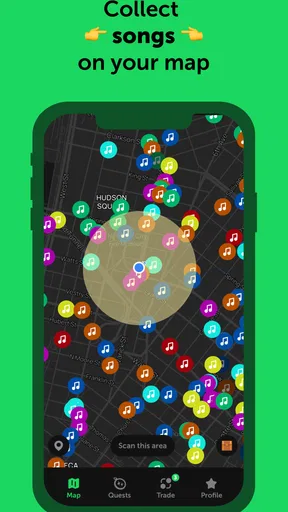
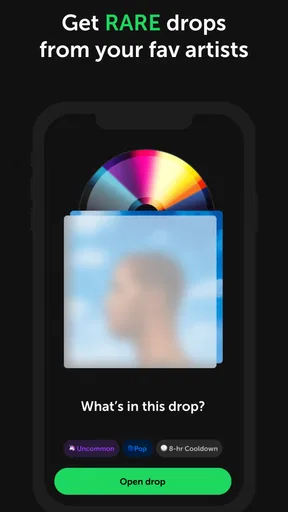
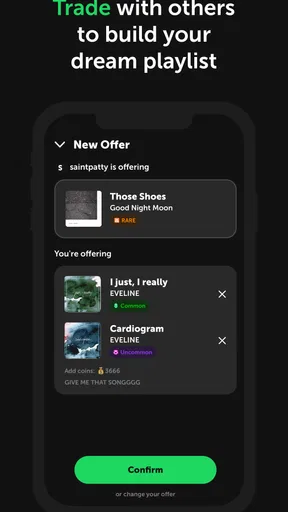
Our Review of Soundmap - Find Your Songs
 Analysis by Appyee
I first turned to Soundmap - Find Your Songs because I wanted a better way to keep track of music I came across and liked. It is a music and audio app from Sincerely Studios Inc., and its focus is collecting and trading with other music fans rather than simply playing tracks. That distinction matters: I found it most interesting when I treated it as a hobby built around discovery and exchange, not as a replacement for a streaming service or a conventional song-recognition tool.
That focus makes the app a good fit for people who enjoy following music beyond the moment they hear it. If you like finding new artists, keeping a personal collection, and comparing discoveries with other listeners, there is a clear reason to give it a try. If all you want is to identify a song once and immediately play it, a dedicated recognition app or your usual music service may be the more direct choice.
A sensible routine for collecting music
I get the most from an app like this by giving each session a small purpose. Rather than opening it without a plan and tapping around, I might spend a few minutes looking for music that fits a mood, checking what I already have, or deciding which items I would be willing to trade. That simple habit makes collecting feel more intentional and helps avoid accumulating things I do not actually care about.
For a realistic everyday example, imagine hearing about a new artist from a friend during lunch. I would make a note to look for that artist later, then use a quieter moment to explore and see whether anything fits my collection. If I find something appealing, I can think about whether I want to keep it or use it as a starting point for a trade. This turns a passing recommendation into a small, repeatable discovery routine without requiring a long listening session.
It is also worth deciding what “a good collection” means to you. Some people may want variety; others may prefer to focus on a handful of artists or a particular sound. Choosing a loose theme makes it easier to recognize what you are looking for and makes trading decisions less random. I would start with a broad interest rather than trying to build a perfect collection immediately, then narrow it as I learn what I enjoy.
Settings and habits that save effort
Before settling into regular use, I would check the app’s available settings and make sure its basic behavior suits the way I use my phone. In a social collecting app, it is sensible to review account and visibility choices, notifications, and any preferences that affect how often the app interrupts you. I would keep alerts limited to the activity I genuinely want to respond to; otherwise, the social side can turn a relaxed hobby into a stream of prompts.
A useful habit is to make a quick decision whenever you add something: keep it, consider it for trading, or leave it alone. Even if the app does not force that workflow, using the same mental categories can make a growing collection easier to manage. It also reduces the chance of offering something you later realize you wanted to keep. When I am unsure, I would wait rather than trade impulsively; a short pause is often more useful than trying to reverse a decision later.
Another practical tip is to treat trades as conversations, not just exchanges. Before accepting one, I would compare the items in terms of my own interests and collection goals, rather than assuming that a seemingly balanced swap is automatically worthwhile. The best trade is the one that leaves me more satisfied with what I have, not necessarily the one that looks most impressive at a glance.
Where it sits beside music apps
Most music apps are built around listening: you search for a track, play it, and move on to the next one. Soundmap takes a different route by making collection and trading the activity itself. That gives music discovery a more social, game-like rhythm, which can be appealing when I want to browse and interact rather than simply put on an album in the background.
The trade-off is that it should not be judged as a full music player. If I want uninterrupted playback, an existing streaming app is a better tool. If I only need to identify a song playing nearby, a service designed specifically for recognition is likely more straightforward. I see this app as a companion for fans who enjoy the collecting side of music, not an all-in-one replacement for listening, library management, and song lookup.
That difference also helps answer whether the social element is essential. It is central to the app’s appeal, because trading and seeing what other fans care about give the collection a shared context. But anyone who prefers a private, purely personal music library may find that emphasis unnecessary. I would choose it for the interaction and discovery loop, not because I expect every part of my listening life to happen there.
Who will enjoy it, and who may not
I would recommend trying it if you like collecting, enjoy comparing music tastes, and are comfortable spending a little time browsing and making choices. It may be especially satisfying for someone who already has a habit of keeping lists of artists to check out or swapping recommendations with friends. The social layer gives those interests somewhere to go, rather than leaving every discovery as a note that gets forgotten.
On the other hand, it may not suit listeners who want music to stay effortless and passive. Trading requires attention, and a collection-focused experience can feel like another task if you are not interested in organizing or interacting. It is also not the app I would pick for someone who mainly wants a dependable place to play saved albums. Knowing that before starting can prevent the common mismatch of expecting a streaming service and finding a collecting community instead.
There is a learning curve in deciding what makes a collection valuable to you. New users can be tempted to chase whatever seems popular or to trade quickly just to stay active. I would resist that pressure and take time to learn the rhythm of the app. A slower start makes it easier to understand what you like and gives your collection a personality instead of a random assortment.
Getting Started with Soundmap
First things first, downloading and setting up the app was a breeze. Available on both Android and iOS, it’s just a quick tap away from joining your app collection. The interface is sleek and intuitive, making it easy to navigate even if you’re not particularly tech-savvy. I appreciated the minimalistic design, which keeps things simple and to the point. No unnecessary frills here, just straightforward functionality.
How It Works
Once you’ve got the app ready to go, using it is as simple as hitting a big button to start listening. Whether you’re in a café, at a party, or just watching TV, Soundmap is ready to identify that elusive track. It’s like having a musical detective on standby. The app works by analyzing the sound waves and matching them to a massive database of songs. In no time, it pops up with the song title, artist, and even album details.
One of the standout features is its ability to recognize not just mainstream hits but also more obscure tracks. I tested it with a variety of music genres, from chart-toppers to indie tracks, and it rarely missed a beat. Plus, it shows you a map of where each song has been identified globally, which is pretty neat if you’re curious about a song’s reach.
Features That Hit the Right Notes
Beyond just identifying songs, Soundmap offers a few extra features that enhance the overall experience. For instance, you can create playlists directly within the app. This means you’ll never lose track of the songs you discover in the wild, and you can easily revisit them whenever the mood strikes.
The social aspect of the app is also worth mentioning. You can connect with friends and see what they’ve been discovering. It’s like a built-in community of music lovers sharing their finds. And if you’re someone who loves digging into music history, the app’s feature that shows trivia and fun facts about each track is a delightful touch.
Real-World Use and Performance
So, how does it perform in real-world situations? I took it for a spin in various environments, from noisy streets to quiet rooms, and it held up remarkably well. Of course, like any app, it’s not infallible. Occasionally, it might struggle in extremely loud or echoey environments, but these were rare instances.
Battery consumption is always a concern with apps that require constant listening, but I found Soundmap to be pretty efficient. It didn’t drain my phone’s battery as much as I feared, which is a huge plus for those long days out.
Cost, age suitability, and version
The app is free to download, so trying it does not require an upfront payment. It does offer in-app purchases, with listed items ranging from under a dollar to several hundred dollars, so I would check the purchase screen carefully and set spending boundaries if that matters to you. Its Teen content rating makes it a more natural fit for teen and adult music fans than for younger children, especially given the social and trading focus.
It launched on June 18, 2024, and the current version is 2.9.8, with Android 8.0 as the minimum operating system. Its average rating is 4.5 from around 100,000 ratings, and it has passed 500,000 installs. Those figures suggest a substantial audience, but they do not tell me whether the collecting loop will suit an individual listener; the best test is whether browsing and trading feel enjoyable to you after the novelty wears off.
Final Thoughts on Soundmap
After spending some quality time with Soundmap - Find Your Songs, I can confidently say it’s a must-have for anyone who loves music. It’s user-friendly, reliable, and packed with features that make discovering new music a joy. Whether you’re a casual listener or a hardcore music aficionado, this app is sure to enhance your listening experience.
So, the next time you find yourself tapping your foot to an unknown tune, just whip out Soundmap, and let it do its magic. You’ll not only find the song but also get a little deeper into the story behind the music. Happy listening!
My final recommendation
My enthusiasm comes with one important qualification: I would recommend it most strongly to people who enjoy collecting and trading as much as they enjoy finding music. The app’s free entry point makes it easy to explore, while the purchase options are worth approaching deliberately rather than treating every offer as necessary. A patient approach, a few personal collection goals, and selective notifications are the habits I would bring with me.
If your priority is simply to identify a song and get back to what you were doing, choose a more direct recognition tool. If you want to play music for hours, keep using a dedicated player. But if you like turning discoveries into a collection and sharing that interest with other fans, Soundmap has a distinct purpose. I would give it a try with modest expectations, build at my own pace, and keep it only if the social collecting loop genuinely makes music discovery more fun.
Verdict
Strengths of Soundmap - Find Your Songs
- User-friendly interface with intuitive navigation.
- Extensive song database with diverse genres.
- Seamless integration with music streaming services.
- Accurate song identification with quick results.
- Customizable playlists enhance user experience.
Limitations of Soundmap - Find Your Songs
- Occasional lag during song identification.
- Requires a stable internet connection.
- Limited offline functionality available.
- Some features require in-app purchases.
- Advertisements can be intrusive at times.
Similar Picks in This Category
View All
YouTube Music
Google LLC4.4

Samsung Music
Samsung Electronics Co., Ltd.3.8

Spotify: Music and Podcasts
Spotify AB4.3

JioSaavn - Music & Podcasts
Saavn Media Limited4.3

Lark Player:Music Player & MP3
Lark Player Studio - Music, MP3 & Video Player4.6

StarMaker: Sing Karaoke Songs
SKYWORK AI PTE. LTD.4.3
Frequently Asked Questions
What is Soundmap and how does it work?
Soundmap is a music discovery app that helps users find new songs based on their current location and musical preferences. It uses geolocation to suggest songs that are trending or popular in the area, providing a unique and localized music experience. Users can explore playlists, save favorites, and share tracks with friends.
Is Soundmap available for both Android and iOS devices?
Yes, Soundmap is available for download on both Android and iOS platforms. Users can find it on the Google Play Store for Android devices and the Apple App Store for iOS devices. Ensure your device meets the app’s compatibility requirements for optimal performance.
Does Soundmap require an internet connection to function?
Yes, Soundmap requires an internet connection to provide real-time song recommendations and updates. The app relies on geolocation and online music databases to suggest songs that are popular in your current area. A stable internet connection ensures the best user experience.
Are there any subscription fees or in-app purchases in Soundmap?
Soundmap offers a free version with basic features, but it also has premium options available through subscription. The premium version may include additional features like ad-free listening, offline access, and exclusive content. Check the app’s store listing for detailed pricing information.
How does Soundmap ensure user privacy and data security?
Soundmap prioritizes user privacy by implementing robust data encryption and privacy policies. The app only uses location data to enhance the user experience and does not share personal information with third parties. Users can review the privacy policy on the app’s official website or within the app settings.
